top of page


Lego Robotics: Space
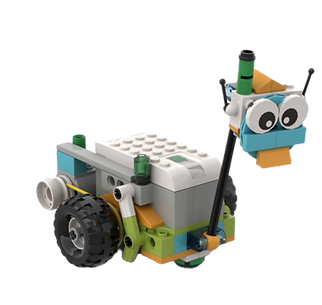
Introduction to Lego Robotics. Kids will explore core engineering principles through an exciting Space Journey theme, discovering how great engineering solves real-world challenges. They’ll build and experiment with space-inspired projects like rovers, examine key components, understand mission challenges, and learn basic coding along the way
Once there are plans available for purchase, you’ll see them here.
No plans available
* For more information about packages and membership please visit our Pricing page
Course outline
Class name | Class Description | Class objectives | Key takeaways |
|---|---|---|---|
Aly the space rover. Space missions | Introduction to Lego Robotics. Kids will explore core engineering principles through an exciting Space Journey theme, discovering how great engineering solves real-world challenges. They’ll build and experiment with space-inspired projects like rovers, examine key components, understand mission challenges, and learn basic coding along the way | Introduce students to LEGO WeDo 2.0 by guiding them through a space-themed mission where they design and build an autonomous vehicle that operates using their own code. The lesson leads kids through the entire mission—constructing the vehicle, programming it, and seeing it run independently | - Space vocabulary: What is rover and what their missions
- Lego vocabulary: Hub, motors, sensors,
- Basic coding: Motor blocls |
Satelite. Exploring the space | In this class, students explore what satellites are, how they orbit Earth, and why they are important in everyday life. Through fun activities and LEGO WeDo 2.0 building, kids learn about early satellites like Sputnik 1, modern satellite technology, and how GPS helps us navigate the world. The lesson brings space science to life in a simple, hands-on way. | Understand the difference between natural and artificial satellites.
Explain the purpose of satellites and how they orbit Earth.
Recognize key parts of modern satellites (solar panels, antennas, instruments).
Describe what GPS is and how satellites help it work.
Build and explore a simple satellite model using LEGO WeDo 2.0. | - Space vocabulary: What is sattelites, types, what they are doing
- Basic coding: Motor blocls, tilt sensor, sound control |
Advanced mars rover. Our universe | In this lesson, students explore how NASA’s Mars rovers work and then build their own LEGO WeDo 2.0 rover that can navigate like a real robot on another planet. Kids learn how rovers detect obstacles, reverse, pause to “examine” the environment, and repeat their exploration loop automatically. Students follow a step-by-step coding guide, using sensors and conditions to make their rover behave independently—just like Perseverance on Mars. | Learn what Mars rovers do and how they explore harsh environments.
Build a simple LEGO rover model inspired by Perseverance.
Program the rover to move forward, detect obstacles, reverse, pause, and loop actions.
Use sensors and conditional logic to create autonomous rover behavior.
Apply basic debugging by testing and improving their code. | Autonomous behavior: The rover repeats actions on its own using loops.
Sensor reactions: The distance sensor detects obstacles and triggers backup actions.
Conditional coding: “If obstacle detected…” leads to different robot responses.
Step sequencing: Students follow mission steps: move → detect → reverse → pause → repeat.
Safe stop: A key press event immediately stops the entire program.
Real-world connection: Rovers continuously scan the environment just like real NASA robots. |
Radar. Connecting Earth with Space | Students explore radar technology by building and programming a Lego WeDo 2.0 radar system. They'll learn how radar detects objects using radio waves, then code their model to sense objects, send alarm messages, and create blinking light patterns. The lesson combines real-world STEM applications with hands-on block programming. | Explain how radar works and name 3 real-world uses
Build a functioning Lego WeDo 2.0 radar model
Program object detection with alarm responses
Use message-based communication between code blocks
Create custom LED blinking patterns | Radar operation pcinciples
Programming Challenge:
Build a radar that runs at speed 5, detects objects, sends alarm messages, plays sound alerts, and blinks LED lights
Skills Developed:
Event-driven programming with message passing
Conditional logic (if/then detection)
Creating patterns with loops and timing
Parallel code execution (multiple responses to one trigger) |
Lunar Rover. Vechicles on other planet | Students build and program a LEGO WeDo 2.0 lunar lander while learning about the historic Apollo 11 moon landing. Using tilt sensors and block coding, they'll simulate a lunar landing sequence and explore the challenges astronauts faced in 1969. | Build a lunar lander model using LEGO WeDo 2.0
Program tilt sensor controls for three landing positions
Create subprograms using message-passing
Display visual feedback showing the Moon surface
Learn about the Apollo 11 mission and space exploration
| Programming Concepts:
Subprograms and message passing
Loops (repeat blocks)
Event-driven programming
Conditional sensor responses
Real-World Connection:
Spacecraft control systems
Remote vehicle operation
|
bottom of page