top of page


Coding basics
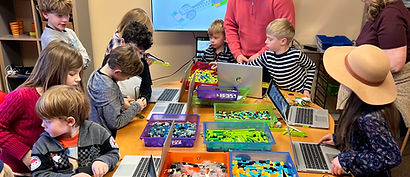
Coding Basics. Kids will discover the fundamentals of programming and computational thinking through fun, hands-on activities. They’ll start by learning algorithms and step-by-step problem-solving in unplugged exercises, then progress to block-based coding with Scratch and interactive projects using LEGO and Sphero robots. Students will also get a sneak peek into text-based coding with Python, developing creativity, logical thinking, and practical coding skills they can apply to real-world projects
Once there are plans available for purchase, you’ll see them here.
No plans available
* For more information about packages and membership please visit our Pricing page
Course outline
Class name | Class Description | Class objectives | Key takeaways |
|---|---|---|---|
Python basics | In this class, students get a gentle introduction to Python, a real programming language used by engineers, scientists, and game creators. Kids learn that Python uses words and simple commands instead of blocks. Through guided examples and fun activities, students explore how Python can display messages, follow instructions, and make decisions, building confidence and curiosity for text-based coding. | "Understand what Python is and where it is used
Learn how text-based coding is different from block coding
Follow simple Python instructions step by step
Write basic commands such as showing text and numbers
Learn what a variable is in a simple, kid-friendly way
Practice running and changing code to see results
Build confidence using a real programming language" | "Python is real code: Professionals use it every day
Code is instructions: Computers follow written commands
Text instead of blocks: Words replace puzzle pieces
Variables store information: Like labeled boxes
Try and change: Coding improves through testing
Strong foundation: Python builds skills for advanced coding" |
Sphero robotics | In this class, students are introduced to Sphero robots and learn how coding can control movement, lights, and behavior in a real rolling robot. Kids explore how commands written on a tablet or computer make Sphero drive, turn, and react. Through fun challenges and hands-on play, students connect coding concepts with real-world robotics while developing problem-solving, teamwork, and creativity. | "Learn what a robot is and how Sphero works
Understand how code controls robot movement
Use block-based coding to drive and control Sphero
Practice sequencing commands to complete simple missions
Learn basic movement concepts (forward, turn, speed)
Explore cause-and-effect between code and robot behavior
Build confidence working with real robotic systems" | "Robots follow code: Sphero moves based on instructions
Sequencing matters: Commands must be in the correct order
Coding controls motion: Speed, direction, and turning come from code
Real-world robotics: Code affects physical movement, not just screens
Problem-solving: Testing and adjusting improves results
STEM connection: Coding, engineering, and play work together" |
Using Scratch with Lego | In this class, students connect digital coding with real-world movement by using Scratch to control LEGO models and robots. Kids learn how code written on a screen can make motors spin, models move, and robots react. By combining Scratch block coding with hands-on LEGO building, students see their programs come to life, building excitement and a deeper understanding of how software controls hardware. | "Understand how Scratch can control LEGO models and robots
Learn the connection between code on a screen and movement in the real world
Use Scratch blocks to control motors and actions
Practice sequencing commands to create predictable movement
Learn how sensors (if used) can trigger actions
Develop problem-solving and logical thinking through testing and debugging
Build confidence working with both code and physical robots" | "Code controls machines: Programs can move real objects
Software meets hardware: Scratch connects digital ideas to physical action
Sequencing matters: LEGO models follow commands in order
Cause and effect: A block change can change robot behavior
Debugging: Problems are solved by testing and adjusting code
STEM connection: Coding, engineering, and robotics work together" |
Scratch block coding | In this class, students are introduced to Scratch, a visual block-based coding platform that makes programming fun and easy to understand. Kids learn how to create simple animations, games, and interactive stories by snapping code blocks together like puzzle pieces. Through hands-on exploration, students discover how characters move, react, and perform actions, building confidence in coding while developing creativity and logical thinking. | "Understand what Scratch is and how it is used to create programs
Learn how block-based coding works without typing text
Explore the Scratch interface: stage, sprites, and code area
Use basic blocks to make a character move and react
Practice sequencing instructions in the correct order
Learn how events (like clicking a flag or key) start programs
Build confidence creating their first interactive project" | "Coding is visual: Blocks snap together to form programs
Sequencing matters: Actions happen in the order blocks are placed
Sprites and stages: Characters act on a digital stage
Events start programs: Code runs when something happens
Creativity + logic: Coding combines imagination and thinking
Foundation skill: Scratch prepares students for robotics and text-based coding" |
Algorithms & Step-By-Step Thinking (Unplugged Coding) | In this class, students learn how computers think by exploring algorithms without using computers. Through fun unplugged activities, games, and real-life examples, kids practice breaking problems into clear, step-by-step instructions. Students learn that coding is not about typing—it’s about thinking logically, giving precise directions, and solving problems in the right order. This lesson builds strong foundations for Scratch, robotics, and future programming. | "Understand what an algorithm is in simple terms
Learn how to break tasks into clear, ordered steps
Practice giving precise instructions to avoid mistakes
Identify sequences, patterns, and logical order
Understand why computers need exact directions
Build problem-solving and critical thinking skills
Prepare for block-based and robot coding" | "Algorithms are instructions: Computers follow steps exactly
Order matters: Changing steps can change the result
Think like a computer: Clear, simple directions work best
No computers needed: Coding starts with thinking
Mistakes help us learn: We fix algorithms by improving steps
Foundation skill: Algorithms power games, robots, and apps" |
bottom of page